

Wiring Harness with XC Course
Master The New Trends With Capital XC
Learn to design, route, and test wiring harnesses using CATIA or Creo. Build libraries, create harness drawings, simulate schematics for voltage drop, fuse blowouts, and short circuits in Capital Harness XC. Ensure high-quality reports and seamless 3D integration for efficient designs.
3 Months of Training
Live Online Classes
12 Modules
Course Details
- Course Duration
Entire course – 03 Months
- Lectures Schedule
Per week 3 lectures 1.5 hours
- Weekly Doubt Session
One-On-One Doubt Solving
Softwares Covered
Topics You'll Learn
- Cabling Process Overview
- Cabling Terminology
- Environment and Configuration Setup
- Electromechanical Model Setup
- Manual Designation and Parameters
- Manual Spools
- Manual Cabling Features
- Logical Reference Technique
- Routing Methods
- Modifying Cabling Assemblies
- Additional Routing Features
- Networking
- Cabling Assembly Deliverables
- HARNESS-MFG
About MechEase
Based in Pune Since 2017, we provide Domain Based Engineering and Technology Training’s to Industry Design Professionals and Fresh Mechanical Engineers.
Our Records
Our Reviews
EXCELLENT Based on 125 reviews Posted on Google KomalpatoleTrustindex verifies that the original source of the review is Google. "I joined MechEase with no prior CAD knowledge, and now I can confidently create engineering drawings and 3D models. The trainers are patient, the environment is friendly, and the placement assistance is excellent."Posted on Google Sakshi NikamTrustindex verifies that the original source of the review is Google. Best training institute with experienced trainers, practical learning, and excellent placement support.The faculty is very helpful,andthe course content is industry -oriented.Highly recommended!Posted on Google Ruchita KulkarniTrustindex verifies that the original source of the review is Google. I had a great learning experience at MechEase Training Institute. The trainers are knowledgeable, the practical training is excellent, and the placement support is very helpful. I highly recommend MechEase for quality technical training and career growth.Posted on Google Ankita SimaneTrustindex verifies that the original source of the review is Google. MechEase Training Institute provides excellent classes and practical training. lectures are clear, faculty members are supportive, and the placement assistance is very helpfulPosted on Google Prajakta GhadgeTrustindex verifies that the original source of the review is Google. I'm very satisfied with my experience at MechEase Training Institute. The teaching methodology is excellent, and the trainers focus on both theoretical concepts and practical applications. The classes are interactive, and all doubts are cleared with patience. The supportive staff and positive learning environment make it a great place to develop technical skills. I highly recommend MechEase Training Institute to anyone looking for quality training in Mechanical, Civil , Electrical/Electronics ,Domains and other engineering software...Posted on Google Rudraksh PawarTrustindex verifies that the original source of the review is Google. I had a very good learning experience at MechEase Training Institute. The trainers explain SolidWorks concepts clearly with practical examples. I learned part modeling, assembly, sheet metal, and drawing creation through hands-on practice. The staff is supportive and always ready to solve doubts. This training has improved my CAD skills and confidence. I recommend this institute to mechanical engineering studentsPosted on Google Borale Chandraaditya ChandrashekharTrustindex verifies that the original source of the review is Google. Good institute. Learning environment is Friendly.I had a great learning experience at MechEase Tech Center. The faculty members are experienced professionals who provide detailed training on Wire Harness Design and Capital Harness XC. The practical assignments, live projects, and interview preparation sessions helped me improve both my technical and communication skills. The institute also provides excellent placement support. Thank you, MechEase, for helping me take a step forward in my career.Verified by TrustindexTrustindex verified badge is the Universal Symbol of Trust. Only the greatest companies can get the verified badge who has a review score above 4.5, based on customer reviews over the past 12 months. Read more
Topics You'll Learn
- Cabling Process Overview
- Cabling Terminology
- Environment and Configuration Setup
- Electro mechanical Model Setup
- Manual Designation and Parameters
- Manual Spools
- Manual Cabling Features
- Logical Reference Technique
- Routing Methods
- Modifying Cabling Assemblies
- Additional Routing Features
- Networking
- Cabling Assembly Deliverables
- HARNESS MFG
Detailed Syllabus
Click to Expland
Chapter 1 : Process Overview
Electromechanical Overview
Duration - 4Hrs
Topics:
- Process Overview
Chapter 2 : Overview and Environment
Overview and Environment
Duration - 4Hrs
Topics:
- Cabling Process Overview
- Cabling Terminology
- Create a New Cabling Assembly
- Set Up Environment
- Model Tree Use in Cabling & Color Settings
Hands-On Practical:
- Set Up the Configuration File - Config.pro
- P2a - Initial Environment Setup
Chapter 3 : Electromechanical Model Setup
Fundamental Schematic Design in Capital Logic
Duration - 4Hrs
Topics:
- Placement Models
- Electromechanical Models Types & Entry Points
- Obtaining Models - Manual Creations, Vendor Model, Creo Parametric Connector Library/CATIA
- Cable Activation.
- Create a Harness Part & Create Harness Subassembly
Chapter 4 : Designation and Parameters (Manual)
Advanced Schematic Design in Capital Logic
Duration - 4Hrs
Topics:
- Manually Designate Models
- Electromechanical Model Parameters
- Assign Parameters - Modify Values, Add or Delete Values, Assigning Values
Hands-On Practical :
- Manually Designate Models
Chapter 5 : Spools (Manual)
Spools (Manual)
Duration - 10Hrs
Topics:
- Manual Spool Creation - Spool Types, Cable Stripes, Default Spool Paramaeters
- Modifying Spool - Redefining, Renaming Spools.
- Storing and Retrieving Spool Files
- Iterative validation and optimization of designs.
Hands-On Practical :
- Manually Create Spools
Chapter 6 : Cabling Features (Manual)
Wiring Harness Design with Capital Integrator
Duration - 8Hrs
Topics:
- Wire, Cable, and Ribbon Features
Hands-On Practical
- Manually Create Cabling Features
Chapter 7: Logical Reference Technique
Analysis and Validation with Capital Analysis
Duration - 8Hrs
Topics:
- Introduction to Logical Reference
- Logical Reference Option - Ref Diagram, Clear Reference, Import, Compare, Export, Update
- Designate Models Using Logical References - Manual & Auto Designation
- Entry Ports from Logical References
- Spools from Logical References
- Cabling Features from Logical References
- Modifying Component Parameters
Chapter 8: Routing Method
Routing Method
Duration - 20Hrs
Topics:
- Introduction to Routing
- Route Wires and Cables
- Route with Bundles - Creating Bundles, Options, Creating Bundles On The Fly
Hand-On Practical
- Manual Routing - No Logical References
- Manual Routing - Logical References
Chapter 9: Modifying a Cabling Assembly
Modifying a Cabling Assembly
Duration - 8Hrs
Topics:
- Cabling Tab
- Route Group - Reroute Segment, Reroute Location
- Modify Menu
- Locations Group
- Logical Data and Components Groups
Hands-On Practical
- Modify a Cabling Assembly
Chapter 10 : Cabling Assembly Deliverables
Cabling Assembly Deliverables
Duration - 4Hrs
Topics:
- System Bill of Materials
- Cabling Information
- Location Information
Hands-On Practical
- Deliverables
Chapter 11 : HARNESS-MFG
Cabling Assembly Deliverables
Duration - 3Hrs
Topics:
- HARNESS-MFG Introduction
- HARNESS-MFG File Structure
- Harness Flattening - Manual, Fan, Auto-Flattening
- Model Placement in a Flattened Harness - Manual, Automatic
- Modifying a Flattened Harness - Modify, Twist, Move Segment, Break, Bend, Delete
- Harness Information - 2D-3D Info, Component, Wire List, Flat Status, Branch Info
Hands-On Practical
- Harness Manufacturing
Chapter 12 : Capital Harness XC (2D)
Capital Harness XC (2D)
Duration - 20Hrs
Topics:
- Creating 2D Drawing - Harness Design in XC, Bundle Adding
- Add connector and terminal, Splice ,wire , Insulations etc
Hands-On Practical
- Capital Harness XC (2D)
Chapter 13 : Industry Oriented Hands-On Project
Learn this in course
Live Hands-On
WH Projects
XC Projects
Hurry !! Limited Time Deal
- 00Days
- 00Hours
- 00Minutes
- 00Seconds
Course Benefits :
- Live Classes
- 119 Hours Training
- Hand's on Learning
- Easy Payment Options
- Offline/Online Support
- Doubt Solving Sessions
- Placement Support
- Certificate of Completion
Become Certified
Students who complete the course curriculum are awarded with a ISO verified certificate
Get a certificate that’s Industry valued and ISO Registered.
Register Yourself !!
Wiring Harness With Capital XC
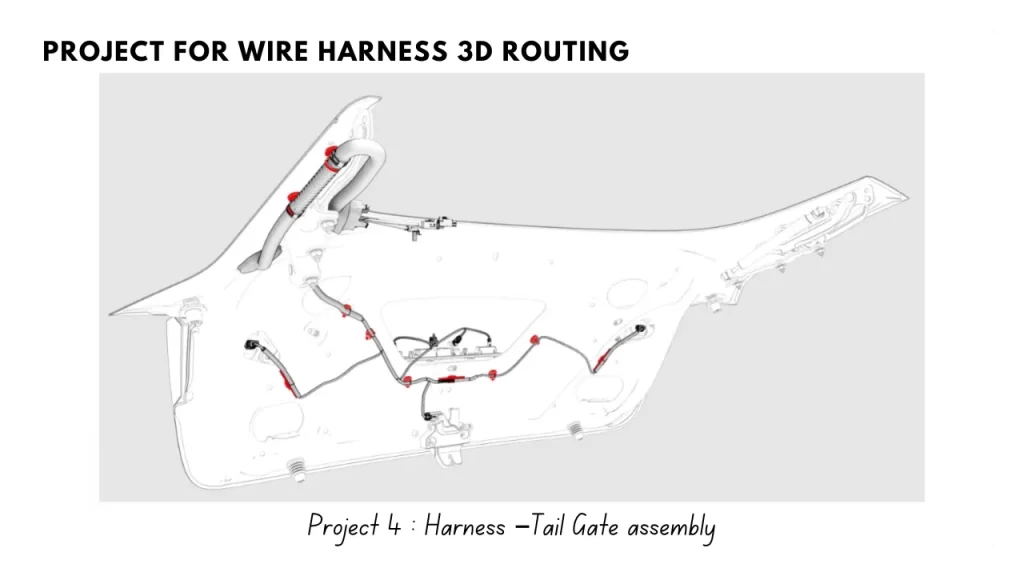
- Wire Harness 3D Routing – Software CATIA or Creo, Design Guide line, wire selection, routing, connector & clip selection, Testing of wire harness.
- Capital Harness Design – Library creation, Harness drawings, simulation of schematics for voltage drop, fuse blown, short circuit, green report etc., interface between these tools with 3D, ensure quality of drawings / reports in the tool.
Our Placements


Get Free Demo & Guidance
Fill in your details, and we’ll give you a quick call! Plus, get a free demo class to experience the best teaching firsthand